
You get a LinkedIn message from a recruiter at a company you're pretty sure you applied to. They want to schedule an intro call.
Good news, but when you open your spreadsheet, you can't find the application. Maybe you forgot to log it. Maybe the row is there but half the columns are empty. You spend twenty minutes piecing together what you sent, when you sent it, and whether you've had any contact since then.
This is what happens when a job application tracker fails at the exact moment it's supposed to help. Knowing how to track job applications isn't the hard part: a spreadsheet takes ten minutes to set up. The hard part is keeping an accurate record across fifty or eighty applications, through stretches of silence, through the weeks when you're too discouraged to open the thing.
This guide covers a system that works at twenty applications and at a hundred and twenty.
How to Track Job Applications in 5 Steps
A job application tracker works when it does three things: shows your active pipeline clearly, surfaces follow-up dates before you miss them, and generates data you can learn from after six to eight weeks. The columns matter less than the weekly review habit that keeps them current.
A system that holds up at 20 applications or 120 comes down to five things:
- Set up lean columns: Company, role, date applied, job URL, current status, and next action + date.
- Use clear status labels: Each status should make the next action obvious without having to think about it.
- Log immediately: Add the application the same day you submit it, while details are fresh.
- Run a weekly review: One day, fifteen minutes, status updates only.
- Read the data: After six to eight weeks, your source column and callback rate should be telling you something actionable.
The rest of this guide covers each step in detail, plus the two things most tracking guides skip: how to keep the system honest when the search gets discouraging, and how to know when to stop following up.
What Your Tracker Actually Needs to Do
Most people build a tracker to stay organized. That's fine, but it undersells what a well-maintained system can do for you, and it's part of why so many trackers get abandoned when the search gets hard.
A tracker doing its job handles three things:
Your pipeline, clear at a glance. How many active applications do you have? What's waiting on a response? What needs a follow-up this week? You should be able to answer any of those in under a minute.
Follow-ups you won't miss. The hiring manager who said she'd be in touch by Friday. The referral you told yourself you'd circle back to. A tracker that doesn't surface those isn't a system — it's just a log.
Data you can actually learn from. Which sources are generating callbacks? Are certain company sizes or industries responding differently? After six or eight weeks, your tracker should be able to tell you something. If it can't, you've been keeping records without keeping data, and that's a lot of effort for very little return.
That third one is what almost every tracking guide ignores. Keeping an accurate record of which resume version you sent each employer is part of that feedback loop, it's more complicated than it looks, and there's a whole section on it below.
The Columns Worth Keeping (And the Ones You Can Drop)
The goal is a tracker you'll actually maintain, whether that's a Google Sheets spreadsheet or a dedicated app. Start lean and add columns only when they earn their place.
The ones you need from day one:
- Company name and role title
- Date applied
- Job posting URL (copy it before you apply; postings disappear fast, and you'll need it for prep)
- Current status
- Next action and date ← this is the one most trackers skip, and it's what makes the difference between a log and a system
- Contact name and email, if you have one
Worth adding once you're past fifteen or twenty applications:
- Source (LinkedIn, company career page, referral, job board: the pattern matters)
- Resume version used
- Salary range, if listed
- Notes from any actual contact you've had
Leave out, at least for now:
- Cover letter text (link to it, don't paste it in)
- Long notes on applications you haven't heard from (most rows won't go anywhere; save detailed notes for roles that actually advance)
- Elaborate color-coding systems that take longer to maintain than they save you
The source column is worth nothing until you have enough rows to see patterns. The resume version column is trickier than it looks (more on that below). And the “Next Action + Date” column is the single most important thing in the tracker. Without it, the system tells you what happened. With it, it tells you what to do next.
Status Labels That Don't Lie to You
The purpose of a status is to make the next action obvious. If you look at a status and immediately know what to do, it's working. If you have to think about it, it's too vague.
Here's a clean nine-stage system that holds up at any volume:
| Status | What it means | What happens next |
|---|---|---|
| Draft | Interested, preparing to apply | Tailor your resume, then apply |
| Applied | Submitted, waiting for a response | Follow up at 7–10 business days if nothing |
| Reviewing | Employer has acknowledged your application | Wait for next contact; note any stated timeline |
| Interviewing | Active interview process underway | Respond promptly; track every scheduled step |
| On Hold | Process paused — their timeline, not a rejection | Check in once at their stated date; then reassess |
| Offer Received | You have a formal offer | Evaluate and respond by the stated deadline |
| Accepted | Offer accepted, role confirmed | Close out other active applications |
| Rejected | Employer passed, or you were passed over after interview | No action. Log it — it's data now. |
| Withdrawn | You removed yourself from consideration | No action. Note why if it's worth remembering. |
A note on “Ghosted” as a status: it names something real, but it leaves applications in limbo indefinitely. That creates false hope and a distorted picture of your actual pipeline. The cleaner rule: if there's been no contact for twenty-one days after your last follow-up, mark it Closed.
Closed isn't a verdict. It's information. A tracker full of honestly-closed rows tells you far more than one full of applications that might still be alive, but probably aren't.

Keeping the Tracker Honest When the Search Gets Hard
Every guide about how to keep track of job applications gets one thing wrong: they assume the hard part is knowing what to track. It isn't.
The hard part is keeping the tracker current during the weeks that feel like failure.
Alex started with an immaculate spreadsheet. Color-coded by stage, updated within an hour of every application. For three weeks, it worked.
Then he got three rejections in five days. He stopped updating. The following week he applied to six more roles and never logged them. Too discouraged to open the spreadsheet.
Two weeks later, a hiring manager called for a phone screen. Alex wasn't sure if he'd even applied to this company. He opened the tracker: twelve applications missing, three rows with outdated statuses, and the record he'd spent three weeks building had quietly stopped being accurate right when it mattered most.
Alex's tracker didn't fail because he lacked discipline. It failed because nobody designs trackers for humans who have bad weeks. The fix isn't more willpower. It's a system built around reality.
A maintenance system that holds up:
Pick one specific day and one fifteen-minute window. Not “whenever I have time.” A specific day. The weekly review has one job: status updates.
During that window:
- Log any applications you submitted since last week
- Update statuses based on responses received
- Check for anything due for follow-up in the next seven days
- Close anything that's been silent for twenty-one days after a follow-up
That's it. Don't research companies during this window. Don't draft emails. Status updates only. Keeping it narrow keeps it doable during the weeks you're running on fumes.
And close things without editorializing. “Closed” is not a judgment. Forty closed applications and twelve in progress is useful data. A tracker with forty rows that are probably closed but you're not quite ready to admit it is just noise.
The Resume Version Problem Hidden Inside Your Tracker
The “resume version used” column is the most misunderstood field in any job application tracker. Every guide tells you to include it. Almost none of them explain what makes it harder than it sounds.
Here's the problem: a resume version record is only useful if it's frozen. If you link to a Google Doc and keep editing that document after applying, the link now points to a different resume than what you actually submitted. The column tells you which file you used. In name only.
Priya tailored her resume for every role and kept three base versions for different types of positions. She logged the filename next to each application. What she hadn't accounted for: she'd been revising those base documents throughout the search.
By week eight, when a callback arrived from a company she'd applied to in week two, the filename in her tracker pointed to a document she'd edited four times since. She couldn't reconstruct what she'd sent. Interview prep was harder than it needed to be.

The manual workaround that actually holds up: export a PDF the moment you submit, name it with the company and date (something like Acme_SrPM_2026-03-04.pdf), and log the filename rather than a live document link. That creates a discipline checkpoint: you have to make the static copy before you can log the application.
At lower volumes, this works fine. At fifteen or more applications a week, it's usually the first thing that breaks down.
Resume version control becomes essential once you're tailoring for every role. That piece covers the full picture, including why the common approaches fail at scale.
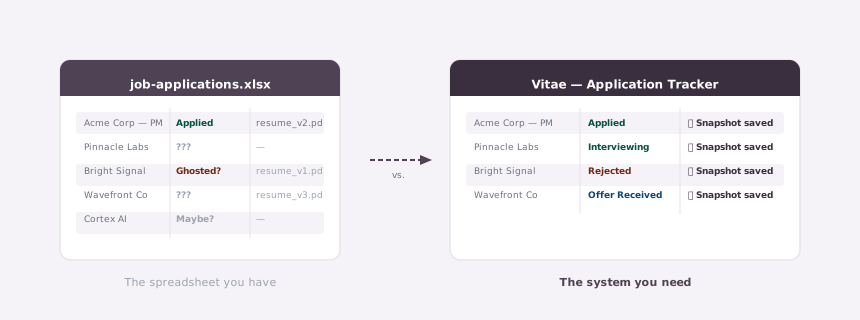
Vitae was built around this exact problem. When you log an application, it automatically snapshots the resume version you were using at that moment, and the record stays frozen even if you edit the resume afterward. Three months later, when a recruiter calls about a role you barely remember applying to, you can pull up exactly what they saw. See how the automatic snapshot tracking works.
What Your Data Should Actually Be Telling You
Most tracking guides stop at “here's how to set up your system.” The part that makes the whole exercise worth doing comes after.
At the end of each week, your job application tracker should be able to answer a few concrete questions:
Which source is actually producing callbacks? If you're applying through LinkedIn, company career pages, referrals, and job boards, do you know which one converts? Most job seekers don't track this. When they do, the results are usually surprising.
Diana had been splitting her applications roughly evenly between LinkedIn Easy Apply and direct applications through company career pages for eight weeks. Seventy applications in, she finally looked at the source column. Twelve of her fourteen callbacks had come from direct company applications. LinkedIn had produced two.
She'd been investing half her time in a channel returning a fraction of the results. Without the data, she had no way to know.
Is your callback rate above or below 10–15%? If you're submitting thirty or more applications and hearing back from fewer than three or four, the problem isn't volume: it's the resume or the targeting. A tracker gives you the denominator you need to diagnose that clearly. Without it, you're guessing at the wrong problem.
Are there patterns in what's moving forward? Industry, company size, how closely you tailored, where you found the role. If you're logging notes from your contacts, you can start to see what distinguishes the applications that progressed from the ones that went quiet.
Which applications have gone quiet enough to close? Honest statuses show you where to stop spending mental energy. An accurate pipeline is only possible when you're closing things that have genuinely run their course.
The question to ask in every weekly review isn't “what happened this week?” It's “what should I do differently next week?” A tracker that can't answer that is a diary, not a tool.
Ghost Jobs and Knowing When to Stop Following Up
One thing most job application tracking guides don't address: a meaningful share of job postings in 2026 aren't active in any real sense. Listings companies put up to build a candidate pipeline, satisfy an internal process, or gauge market interest, with no near-term intent to fill the role. Your tracker helps you recognize the pattern.
When an application sits in “Applied” for six weeks with no response to two follow-ups, you're most likely looking at a ghost job or a process that's been frozen internally. That's not a reflection on your application. It's a signal to close the row and move on.
A follow-up system that doesn't overstay its welcome:
- Log the application and set a follow-up reminder at 7–10 business days out.
- At that date with no response: send one short, specific follow-up if you have a contact. If you don't, note it and wait.
- If an explicit timeline was given (“we'll be in touch by end of month”), follow up one business day after that date passes.
- No response to your follow-up within 10 business days: close it.
Two touches is enough. The goal is one clear signal that you're interested, not sustained pressure. A third or fourth follow-up rarely changes anything with a genuinely engaged company, and it can't revive a dead process.
The broader point: don't let stale applications pile up in “Applied” or “In Progress.” Every row in those stages should represent something you actually expect to hear back from. Zombie applications inflate your pipeline, create false hope, and make it harder to see where your real opportunities are. The Bureau of Labor Statistics consistently finds job searches averaging five to six months, and over that stretch, a tracker that helps you recognize when to cut losses is as valuable as one that helps you stay organized.
How to Build a Job Application Tracking System That Lasts
A tracker that actually works does three things: it shows you your pipeline clearly, it surfaces the follow-ups you'd otherwise miss, and it generates data you can learn from as the search continues.
The columns matter less than the maintenance system. The maintenance system matters less than the commitment to actually use the data: close dead applications honestly, notice when a source isn't working, adjust based on what the numbers say rather than what you hope they say.
That last part is what separates a search that gets smarter over time from one that just gets longer.
A job application organizer that's only good for filing submissions isn't earning its place. Start with the must-have columns. Add source and resume version once you have enough applications for them to tell you something. Build a fifteen-minute weekly review into your calendar and keep it narrow. And when something has been silent long enough that hope has turned into habit — close it.
Frequently Asked Questions
What should I include in a job application tracker?
Start with six columns: company name and role title, date applied, the job posting URL, current status, next action, and follow-up date. Add source (where you found the role) and resume version used once you have fifteen or more applications. That's when patterns start to emerge and the extra columns earn their place.
How often should I update my job application tracker?
Once a week, in a dedicated fifteen-minute window on a specific day. That window has one job: status updates. Log anything submitted since last review, update statuses based on responses, and close anything that's been silent long enough to be genuinely dead. Keeping the review narrow keeps it doable during the weeks the search feels hardest.
How do I know when to stop following up on a job application?
Two touches is enough. Send a brief follow-up at 7–10 business days after applying, and one more if an explicit timeline they gave you passes without contact. No response within 10 business days of your second follow-up: close the application. Three or four follow-ups can't revive a dead process.
What is a ghost job?
A ghost job is a posting that isn't actively being filled. Companies use them to build candidate pipelines, satisfy internal HR processes, or gauge market salary levels, with no near-term intent to hire. If an application has been at “Applied” for six weeks with no response to two follow-ups, you're likely looking at one. Close the row and move on.
Vitae is a free job application tracker with automatic resume version snapshots built in. Set up your profile, log your first applications, and see how it works before you ever think about upgrading.
Create a free accountNo credit card required.