
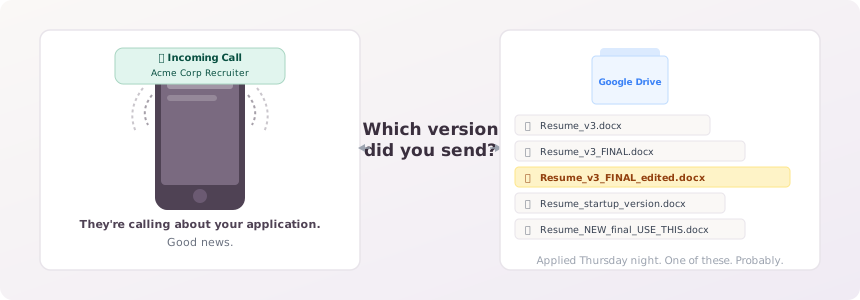
Your phone rings. It's a recruiter from a company you applied to, maybe six weeks ago, maybe eight. They want to do a quick intro call. Good news.
Except you have no idea which version of your resume they're looking at.
You open Google Drive and stare at a folder full of files: Resume_v3.docx, Resume_v3_FINAL.docx, Resume_v3_FINAL_edited.docx. There's one labeled “startup version” and one with no name you can place. You applied on a Thursday night when you were also submitting to three other companies. You genuinely cannot reconstruct what you sent.
This is the resume version control problem. If you've been on an active job search for more than a month, you've almost certainly run into it.
Most advice about managing multiple resume versions focuses on how to create them, tailor for each role, use the job description keywords, keep a master document. What almost nobody covers is how to know, weeks or months later, which exact version you sent to which employer, even after you've kept editing your resume since then.
This article covers what resume version control actually means for job seekers, why the obvious solutions break down, and what a system that actually holds up looks like.
What Is Resume Version Control for Job Seekers?
Resume version control, in a job search context, means maintaining a clear, traceable record of which version of your resume you submitted to each employer, kept frozen even after you update your resume later. Whatever you sent on that day stays captured, regardless of what you do to your resume afterward.
That last part is where most approaches fall apart.
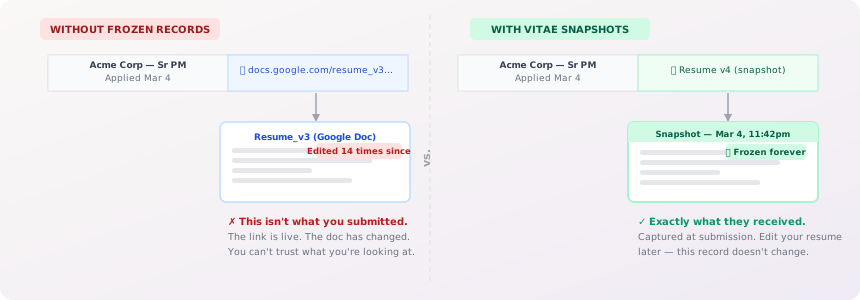
A common setup: you have a master resume in Google Docs, you tailor it for a role, save a copy, and drop the link into your tracking spreadsheet. Done. Except Google Docs links point to live documents. Edit the master after applying, and the “copy” reflects the current state, not what you sent. Six weeks later, the spreadsheet says “Applied” with a link to a document that no longer matches what they actually received.
If you're already tracking applications and want to understand the broader system, how to track job applications effectively covers the full picture. The version control piece is one layer of that.
Why Managing Multiple Resume Versions Gets Out of Hand
If you're applying to two or three jobs, version management is barely a consideration. But that's not how active job searches work.
The math compounds fast. A job seeker targeting roles across two or three different functions might maintain a base resume for each. Add per-application tailoring, reordering bullet points, adjusting the summary, swapping skills emphasis, and you can accumulate a dozen distinct versions within a month. Job seekers applying at any real volume often hit 50, 100, or more applications over the course of a search. The Bureau of Labor Statistics has consistently found that job searches often run five to six months for unemployed workers, plenty of time to generate version chaos.
Here's what that looks like in practice:
Jordan is a project manager transitioning into operations roles. She has three base resume versions, one emphasizing process improvement, one highlighting cross-functional leadership, and one leaning into her logistics background. She applies to about 15 roles per week. By week three, she has 45 applications across three resume tracks, each tailored slightly differently. Her spreadsheet has columns for company, role, date applied, and a link to “the resume.” But she's been editing those base documents as she figures out what's landing. The links no longer point to what she sent. She doesn't know that yet.
This isn't a discipline failure. Jordan is organized. The problem is that the tools she's using, shared documents and spreadsheet links, were designed for collaboration, not version history.
The naming convention trap is the most common attempted fix. Resume_PM_Ops_v2_Feb2026.docx seems reasonable until you have 30 files named that way and can't remember which “v2” is which. File names depend on your memory and your naming discipline at 11pm when you're rushing through one more application before bed.
Duplicate-and-archive (saving a separate PDF per application) is closer to correct. A PDF is static, it won't change after you export it. The problem is that it requires a separate, deliberate action every time, it only works if you do it without exception, and you still need to reliably connect each PDF to the corresponding application record.
At low volume, these workarounds hold. At medium volume, they start slipping. At high volume, they fail.
The Resume Version History Problem That's Costing You
There's a second problem here, less visible than the organizational chaos: without frozen version records, you can't learn from your data.
Active job seekers iterate on their resumes constantly. A new summary, a reordered skills section, a different framing of a key role, you're trying things and watching for feedback. But if you can't accurately link specific resume versions to specific outcomes, you're iterating blind. You don't know if the callbacks came from version A or version B. You don't know if the reordering helped or didn't matter. Six weeks of application data, and the most useful question, “which version is working?”, is unanswerable.
Marcus applied to 40 roles over six weeks and got callbacks from eight of them. He knows roughly which base version he used for each, but his master documents have been edited multiple times since then. He thinks the callbacks might have come from a version that used “led cross-functional teams” instead of “managed cross-functional teams”, or maybe it was when he moved the skills section to the top. He can't confirm, because the records aren't frozen. He's making educated guesses instead of informed adjustments.
The Indeed article on creating multiple resume versions is right that tailoring works. What's missing from that advice is any system for learning from the tailoring over time. That learning requires records you can actually trust.
Proper resume version history isn't just housekeeping. It's the feedback loop that makes a job search smarter as it goes on.
How Most People Try to Solve This (And Where Each Approach Breaks Down)
Let's look at the actual solutions people use, honestly.
Google Drive or Dropbox Folders
Create a folder per application: Applications/Acme Corp/Resume_Acme.docx.
What works: Forces you to create a dedicated copy per application.
Where it breaks: Google Docs links are live. You'd need to export a PDF, not share a Docs link, to get a truly static record. Most people don't do that. And even if they do, the folder structure is disconnected from the application tracker. Two systems, no enforced link between them.
Spreadsheet Plus Resume Link
Add a “Resume Used” column to your tracker and paste the document URL.
What works: Everything in one place.
Where it breaks: The URL points to the current state of the document, not the state at the time you applied. This feels like version tracking but isn't. The LinkedIn advice thread on managing multiple resumes is full of well-intentioned suggestions like this that have the same flaw.
Job Tracker Tools (Teal, Huntr, Others)
Several dedicated job trackers let you attach a resume to an application or note which version you used.
What works: The tracking is connected to the application record. Better than a standalone spreadsheet.
Where it breaks: Most of these tools link rather than snapshot. If you edit the resume after attaching it, the attached version changes too, because it's pointing at the live document. The record tells you “which resume” in name only, not what that resume actually contained when you submitted it. There's a meaningful difference between those two things, especially when you're trying to understand your results.
The fundamental gap across every manual approach: they require a consistent, separate action for every application, and none automatically preserve what was submitted at the moment it was submitted.
What Proper Resume Version Control Actually Looks Like
A reliable system needs exactly two things:
- Automatic capture, the snapshot happens when you log the application, not as an extra step you have to remember.
- Frozen storage, the captured version doesn't change if you update your resume afterward.
Think of it like saving a document at a specific point in time. You're not linking to a live file, you're recording the exact state of that file at the moment the application went out. That record doesn't drift.
This is the problem Vitae was built to solve. When you log an application, it automatically snapshots the resume version you were using at that moment. Edit your resume later, the snapshot stays frozen. Three months from now, when a recruiter calls about a role you barely remember applying to, you can pull up exactly what they saw. No reconstructing from memory, no comparing file dates, no guessing.
The connection between application and resume is built into the workflow. You log the application; the version is captured. There's no extra step to forget.
See how Vitae's resume tracking works if you want to understand the specifics before reading further.
How to Set Up a Resume Version Control System
If you want to build the most reliable manual system possible before committing to a dedicated tool, here's what that looks like:
- Maintain one master resume. Not three. One document, kept current, from which every tailored version is derived.
- Always use “Make a copy,” never edit the master directly. For every application, create a copy of the master, tailor it, export it as a PDF, and apply. The PDF is your record, it's static and won't change. To see what a copy still needs for a given posting, paste both into the free Resume Match tool, which lists the posting's skills your resume is missing.
- Name the PDF with company, role, and date. Something like
Acme_Corp_SrPM_2026-03-04.pdf. Date-stamped names let you reconstruct a timeline if needed. - Store PDFs in a dedicated applications folder. Not the editable source, the PDF. One folder per application, or a single folder with clearly named files. Either works if you're consistent.
- Record the exact PDF filename in your tracker, not a link. A filename survives file moves and folder reorganizations. A link doesn't. And writing the filename forces you to actually create the PDF before logging the application, which is the discipline checkpoint the system needs.
- Log meaningful resume edits separately. When you make a substantive change to the master, not a typo fix, but a repositioning or section reorder, note it. A simple version log at the bottom of the master document works:
v4, March 5, moved skills section up, shortened summary.
The honest assessment: Steps 2 and 4 require consistent discipline every single time you apply. At low volume, that's manageable. At 10-plus applications per week, it becomes another thing to slip. The system works if you work it, every time, without exception. Most people don't, reliably, at scale.
The difference between this and an automated tool isn't the concept. It's the discipline requirement. Manual systems transfer the maintenance burden to you. Automated systems remove it.
Resume Version Control at Scale
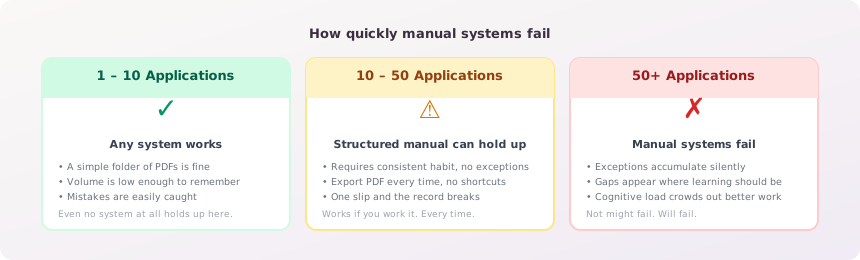
Everything above applies at low to medium application volume. Once you're past roughly 30 applications, and especially past 50, the cognitive overhead of maintaining a manual system starts to compound.
Not just the time. The mental load. Every application adds a small checklist: did I export the PDF? Did I name it correctly? Did I update the tracker? Multiplied across 15 applications per week, that's real energy that could go into better tailoring, better research, better follow-up.
A rough guide:
- 1 to 10 applications: Any system works. Even a simple folder with PDFs.
- 10 to 50 applications: A structured manual system can hold up, but requires consistent habit without exception.
- 50-plus applications: You need automation or you will lose track. Not might, will. The exceptions accumulate, and the gaps in your records are where the learning disappears.
The job seekers who maintain reliable records at high volume are either unusually disciplined (and spending meaningful time on it) or using a tool that handles the capture automatically.
Putting It Together
Resume version control doesn't make or break a job search on its own. But the problems it prevents are real, the recruiter callback where you don't know what they're looking at, the six weeks of application data you can't learn from because the records aren't frozen, the iterating on a resume without being able to connect changes to outcomes.
The fundamentals aren't complicated. Export static copies at the moment of application. Link those copies to your application records. Don't let subsequent edits overwrite your history.
Do that consistently, and you'll have something most active job seekers don't: an accurate record of what you actually did, not a reconstruction of what you think you did.
If tailoring is what keeps multiplying your versions, see how to tailor your resume for every job without rewriting it.
Vitae is free to start. Build your first resume, log your first applications, and see how the automatic version tracking works before you ever think about upgrading.
Create a free accountNo credit card required.