
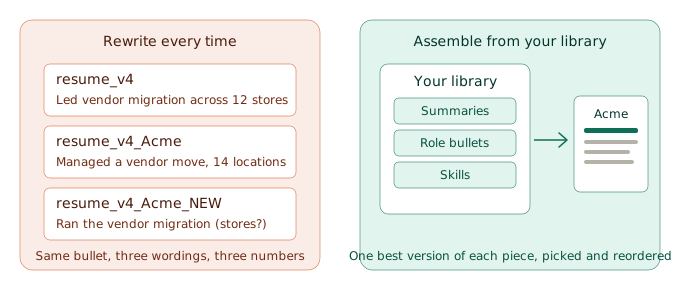
It's 9:40 on a Tuesday night and you've found a job that looks made for you. The posting wants client reporting, you have client reporting, and it's the fourth bullet under your last role. So you open your resume, move that bullet to the top, rework the summary, and save the file as resume_v4_Acme. Tomorrow you do it again. By Friday you have six versions, and the vendor migration bullet reads three different ways across them, because you rewrote it from memory each time.
Tailoring is worth doing. Rewriting is what makes it exhausting. This article is about the difference: what to change for each job, what to leave alone, and how to set things up so a tailored resume is something you assemble, not something you write again.
Why tailoring turns into rewriting
Most people tailor by copying the last resume and editing it. That works for the first few jobs. Then three things happen. The edits pile up, so you can't tell which file has your best version of each bullet. The facts drift, because a number you fixed in one file is still the old number in three others. And every new application starts from whichever file you opened last, not from your best material.
The problem isn't that you tailor. It's that no single place holds your best version of each piece of your history, so every resume is a fresh draft.
What to tailor, and what to leave alone
You don't need to rewrite a resume to tailor it. A reader going through a stack of applications sees the top of the page and the first few lines under each job, so that's where tailoring pays off.
| Tailor | Leave alone |
|---|---|
| Your summary, so it names the kind of role you're applying for | Job titles, employers, and dates |
| The order of your bullets, so the most relevant ones lead each role | Numbers and facts. Change them in one place or not at all |
| The first three bullets under each recent role | Anything you couldn't defend in an interview |
| Which skills you list and in what order | The overall layout |
| Wording that matches the posting, only where it's true | Claims about experience you don't have |
Step one: write each piece once
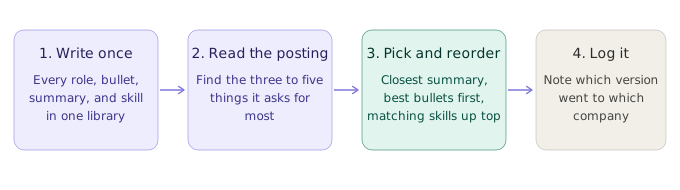
Before you tailor anything, get your material into one place. List every role you've held, and under each one write every bullet you'd ever want to use, including the ones that rarely make the cut. Write two or three summary lines aimed at different kinds of roles. Group your skills. What you're building is a library, not a resume: more material than any single resume will use.
Jordan was switching from retail operations to project coordination when she noticed the same vendor migration bullet in four files, with four different numbers. One said 12 stores and another said 14. She hadn't been careless. She had retyped it from memory each time. Once she wrote it once, with the number she could defend, every later version pulled from the same line. The inconsistency was never a typing problem. It was a storage problem.
If you want a checklist of what to collect, our free Master Resume Inventory walks through the categories.
Step two: read the posting for what it cares about
Read the job description for the three to five things it asks for most. Not every keyword, just the ones that repeat: the title, the first few responsibilities, the requirements marked as required. Then check each one against your library. Some you match exactly. Some you do under a different name. Some you don't have, and that's fine, because you don't write those in.
A skills matcher can speed this up. In Vitae's Skills Matcher (it appears as Job Skill Analysis in the editor's tool list) you paste in the job description and see which of your skills match, which skills the posting wants that you haven't listed, and which of yours it doesn't mention. It points at the gaps. It doesn't write anything for you, and it can't tell you whether to apply. The standard matcher is free. Its AI mode is a Premium feature.
Step three: assemble, don't rewrite
With your library and a short list of what the posting cares about, building the version is picking and reordering. Choose the summary line closest to this role. Lead each recent job with the bullets that match your short list. Put the matching skills first. Leave everything else alone. What you end up with is a tailored resume made from parts you already trust, and it's a much shorter job than a rewrite.
That's how Vitae's Resume Editor works. The Item Editor holds your library, and each resume is assembled by picking and reordering from it. Fix a bullet in the library and the fix carries into every resume that uses it. The free plan includes the library and up to 5 resume versions. Cloning a version to start the next one is a Premium feature, and Premium raises the cap to 50 versions. You can see how the Resume Editor works on the features page.
Where AI fits
Tools like Huntr and Teal lean on AI to draft and tailor your resume for each job. That can save time, and if it's what you want, they're built for it. The tradeoff is that a draft is only as true as the experience you hand it, and you still have to read every line before it goes out.
When you tailor by assembly, the sentences are yours from the start, and tailoring is a matter of choosing and ordering. Vitae does include AI help: an AI chat assistant that can rewrite a bullet, suggest skills, or review a summary, with 20 assists a month on the free plan and 200 on Premium, plus AI cover letter generation on Premium. Use any of these tools, and check each line against what you could say in an interview. For a wider look at the trackers and resume tools out there, see our review of the best job application trackers.
Keep track of what you built
Tailoring creates versions, and versions are what you lose track of. After 30 applications you'll have a dozen assembled resumes, and the one a recruiter calls about won't be the one you have open. Write down which version went to which company at the moment you send it. A spreadsheet column works.
Vitae can do it for you. Log an application and it saves a snapshot of the exact resume you used, frozen even if you edit your library later. Snapshots are included on the free plan for up to 5 applications, and Premium raises that to 200. The longer story on why this matters is in The Resume Version Control Problem.
The bottom line
Tailoring doesn't have to cost you an evening per application. The expensive part was never the tailoring. It was rebuilding your best material every time. Write it once, choose what fits, and spend the time you saved on the part only you can do, which is deciding which jobs are worth applying to.
If you want to try it, create a free Vitae account below, build your library, and assemble your first tailored version from it. The free plan includes up to 5 resume versions, and you can see what Premium adds on the pricing page.
Vitae keeps your applications, resume snapshots, and follow-up dates in one place, so when the recruiter calls, you have the right information ready.
Create a free accountFree to start. No credit card required.