
Preethi spent a Sunday afternoon in April reconstructing four months of job search history from confirmation emails and browser bookmarks. She counted 68 applications. She had thought it was closer to 40. Her spreadsheet, which started thorough, had collapsed into something unreliable by week five: blank rows, wrong dates, a “Resume Used” column that read “updated version” for twenty straight entries.
Most job seekers reach a version of this. The question is which tool actually solves it.
This comparison covers the five best job application trackers worth your time: Vitae, Huntr, Teal, Jobscan, and spreadsheets. One of them is ours. We'll tell you when we get there, and we'll tell you the same things we'd say if it weren't.
Pricing for all tools is included. Numbers can change, so check the tool's pricing page before subscribing, but comparisons here are accurate as of June 2026. If you're still deciding whether you need a tracker at all, how to track job applications covers the case from the beginning.
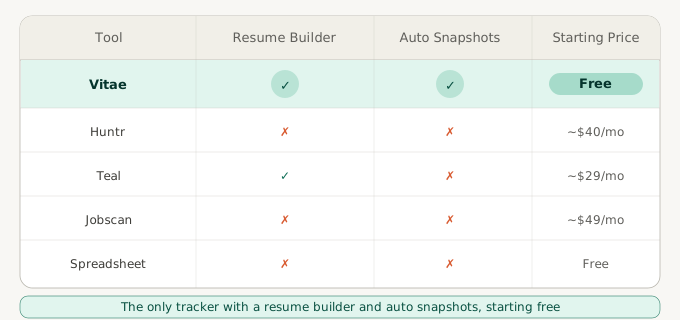
Quick Comparison: Best Job Application Trackers at a Glance
| Tool | Price | Resume Builder | Kanban View | Auto Resume Snapshots |
|---|---|---|---|---|
| Vitae | Free or $12/month | Yes | No | Yes |
| Huntr | ~$40/month | No | Yes | No |
| Teal | ~$29/month | Yes | No | No |
| Jobscan | ~$49/month | No | No | No |
| Spreadsheet / Notion | Free | No | No | No |
Vitae is the only tool in this comparison with both a resume builder and automatic resume snapshots, at the lowest paid price point. “Auto Resume Snapshots” means the tool captures the exact version you submitted at the moment of logging, so when an interview arrives six weeks later, you know exactly what they received. Each section below explains the full picture for each tool.
Vitae: Best for Resume Version Tracking
Full disclosure: Vitae is our product. We built it because we kept running into the same problem, applying to roles with different tailored resumes and having no reliable way to know which version we'd sent when an interview came in. Everything below is accurate, and we've tried to write it the same way we'd write a competitor's section.
Vitae is a job application tracker built around one specific problem: connecting your resume versions to your applications. When you log an application in Vitae, it automatically saves a snapshot of the resume you were using at that moment. Edit the resume afterward, and the snapshot stays frozen. Three weeks later, when you get an interview request, you can pull up exactly what the recruiter received.
No other job application tracker in this comparison does this automatically. That's not spin; it's the one thing we checked for across every tool before writing this.
Daniel got a first-round phone screen for a product role at a fintech company. He had applied seven weeks earlier with a version of his resume built around payments experience. In the weeks since, he'd done a significant rewrite, cutting that section almost entirely to focus on his operations background for other applications.
When the interview request came, he opened his current resume, couldn't find the payments section, and spent twenty minutes digging through his downloads folder trying to identify the right version. He found it with five minutes to spare. He got through the screen, but the prep was a scramble it didn't need to be.
This is the scenario Vitae's snapshot feature prevents. For a deeper look at why version records matter across a full job search, resume version control covers the broader picture.
Pricing: Vitae is a free job application tracker to start: the free tier includes 5 resume versions and 5 cover letters with no credit card required. Premium starts at $12/month, or $8.28/month on an annual plan. See the full pricing breakdown.
What Vitae doesn't do: There's no Kanban pipeline view. No job board integration to pull listings automatically. No job matching features that connect you to new listings. Vitae is a newer, smaller product than Huntr or Teal, and the feature set reflects that. If you want a visual board or job discovery built into your tracker, the tools below may serve you better.
Who it's for: Job seekers who want a resume builder and an application tracker with automatic version control in one place. The snapshot feature is the reason to choose Vitae over other tools that also have a resume builder. If you're actively customizing per role, knowing exactly which version you sent is what makes the difference.
See how the resume tracking works if you want to understand what it looks like in practice.
Huntr: Best for Visual Pipeline Tracking
Huntr is one of the most established job application trackers available, and it shows. The interface is polished, the Kanban pipeline board is genuinely well-designed, and the browser extension makes logging new applications fast. If you've used Trello or a similar project management tool and liked that structure, Huntr will feel familiar immediately.
The core experience is a visual board: columns for Wishlist, Applied, Phone Screen, Interview, Offer, and Rejected. You drag cards as your status changes. For job seekers who think in pipelines and want to see at a glance where every application stands, Huntr is the most visual option here.
The contact management feature is worth noting. You can attach recruiter names and email addresses to specific applications, which helps with the problem of losing contact information mid-process. Notes and follow-up reminders are available at the application level. The organizational depth is real.
Pricing: Approximately $40/month. Huntr offers a free tier with caps; check their site for the current limits, as these have changed over time.
What Huntr doesn't do: There's no automatic resume version linking. You can attach files manually to each card, but there's no feature that captures the exact resume version submitted at the time of logging and freezes it there. If resume version tracking is your primary concern, Huntr requires manual discipline to stay accurate.
Who it's for: Visual thinkers who want a polished pipeline board and find that seeing applications laid out in columns helps them stay organized. The product is polished and established, the browser extension is fast, and the contact management features are strong. Budget about $40/month for it.
Teal: Best for All-in-One Career Tools
Teal is more of a career platform than a pure application tracker. It includes a resume builder, job listing aggregation and matching, and application tracking in a single product. The job matching component is the differentiator: Teal surfaces relevant listings based on your profile and connects them to your application pipeline, which no other tool here does.
The breadth is real and the active development shows. Teal covers a lot of ground, and for job seekers who want job discovery, resume building, and application tracking in one place, it's the most complete option in this comparison. The tradeoff is that no single piece of it is as deep as a focused tool. The application tracker works but isn't as organizationally precise as Huntr's Kanban board or Vitae's snapshot system.
One honest note on pricing: Teal at roughly $29/month sits between Vitae and Huntr. Whether the breadth justifies the cost depends on how much you'll use the job matching and broader career features.
Pricing: Approximately $29/month. A free tier is available; check Teal's site for current feature limits.
What Teal doesn't do: It does not automatically snapshot the resume version you submitted at the moment of application. If your primary need is knowing exactly which version of your resume a specific recruiter received, Teal doesn't solve that automatically.
Who it's for: Job seekers who want job matching, resume building, and application tracking in one product. If you're spending time hunting for listings across multiple job boards and want that integrated with your tracker, Teal is built for that workflow. If you just need a tracker and a resume builder without the job discovery layer, you may be paying for features you won't use.
For plans, real cost over a long search, and the resume you sent, see our Teal alternative page.
Jobscan: Best for ATS Keyword Optimization
Jobscan comes up frequently in searches for job application trackers, but it does something meaningfully different from the other tools here. Jobscan is primarily an ATS keyword analyzer: you paste in a job description, it compares it against your resume, and it tells you which keywords you're missing and how closely your resume matches the requirements. The application tracking feature is there, but it's secondary to that core function.
If your main concern is whether your resume is passing automated screening filters, Jobscan is better at that than any other tool in this comparison. It's been doing ATS optimization longer than most, the keyword matching is specific and actionable, and it covers a range of ATS platforms that many alternatives don't.
The tradeoff is that the organizational side is lighter. You won't get a Kanban board, resume version snapshots, or deep pipeline management. Jobscan is a focused tool and the focus is keyword optimization, not application tracking.
Pricing: Approximately $49/month. Free keyword comparisons are available with limits.
Honest note on fit: Jobscan and the other tools in this comparison aren't really competing for the same user. Vitae tracks what you submitted; Jobscan helps you optimize what you submit. Huntr and Teal manage your pipeline.
A job seeker focused on getting resumes past ATS filters has a different primary need than one focused on organizational clarity across a high-volume search. If you want both, you'd need two tools, and that's a legitimate combination.
Who it's for: Job seekers whose primary concern is ATS keyword optimization. If that's the specific problem you're solving, Jobscan is the answer here. If you're looking for an application tracker and don't have a specific ATS gap to close, the $49/month is hard to justify for what the tracker component delivers.
Spreadsheets and Notion: Best if You'll Actually Maintain It
The honest case for spreadsheets: they work. For a job search at lower volume, a well-built spreadsheet gives you most of what a dedicated tracker gives you, costs nothing, and requires no setup beyond the initial build. Job seekers who are methodical and willing to put in the logging time can run a successful search entirely from a spreadsheet.
The honest limit: spreadsheets break down at scale and under time pressure. The breakdown usually doesn't look like giving up. It looks like Preethi's April spreadsheet: columns in place, intentions intact, data gradually becoming incomplete as the pace of applications outpaces the time available to log them carefully.
By week five of Preethi's search, she was applying to twelve or fifteen roles a week. Logging each one required opening her spreadsheet, creating a new row, confirming the date, writing out the company name and role, finding the resume file in her downloads folder to note the version, and pasting in the job description link. Each entry took three or four minutes she often didn't have.
She started abbreviated entries. Then she started skipping entries for roles she felt less confident about. By week seven, the records were too incomplete to trust.
The problem is friction. When the system requires too many steps, it degrades exactly when the search is at its highest volume.
If you prefer building your own system or are early enough in your search that volume isn't yet the constraint, a spreadsheet is a genuinely viable starting point. How to track job applications covers how to build one that stays accurate longer, and when the tradeoffs start pointing toward a dedicated tool.
How to Choose the Right Job Application Tracker
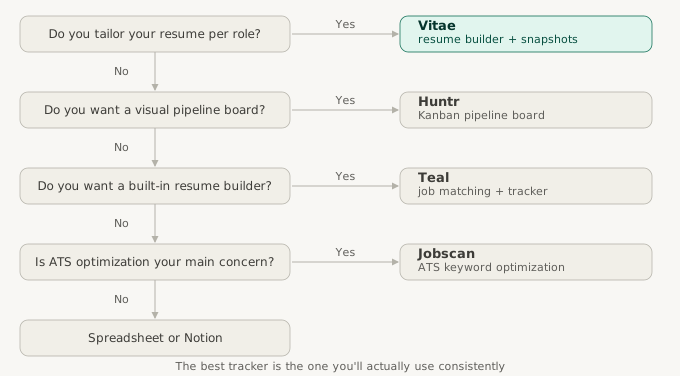
The five tools here solve different problems for different users. The wrong choice usually isn't a bad tool. It's a tool built for someone else's job search.
Choose Vitae if you want a resume builder and application tracker with automatic version snapshots. It's the only tool here that links the exact resume you submitted to each application at the moment of logging. If you tailor your resume per role, that's the piece that makes everything else easier.
Choose Huntr if you want a visual Kanban pipeline and find that seeing your applications as a board helps you stay organized. Budget about $40/month for it.
Choose Teal if you want job matching integrated with your tracker and resume builder. If you're not using job matching, the value proposition narrows compared to the tools above it in this list.
Choose Jobscan if your primary concern is ATS keyword optimization. It does that better than any other tool in this list. Know going in that the tracker is secondary to that core function.
Use a spreadsheet if you're early in your search, under thirty or forty applications, and prefer the control of a custom system. Build it carefully and plan to reassess if consistency starts slipping.
Most tools offer a free tier or a free trial period. The lowest-risk path is to pick the one that matches your actual use case and test it for two weeks before committing to a paid plan. A tracker you'll actually use consistently is more valuable than a more feature-rich tracker you'll stop opening.
Sofia started her search with Huntr. The Kanban board appealed to her, but she found the $40/month difficult to justify after two months of applying and not seeing many callbacks. According to industry data, roughly 8% of applications generate a recruiter response. At that rate, Sofia knew she needed to stay organized at volume.
She switched to a Notion template, which worked for about three weeks before it became more of a documentation project than a tracking tool. She moved to Vitae in month three, which meant rebuilding records she had mostly but not perfectly kept. Once her records were in order, the rest of her search ran from a single view. The switching cost was real. Not catastrophic, but avoidable. Starting with the right fit is worth the extra time to decide.
The Bureau of Labor Statistics finds job searches averaging five to six months for unemployed workers. At ten to fifteen applications per week, that's several hundred applications over the course of a search. At that volume, the tracker you choose shapes the entire experience.
Vitae keeps your applications, resume snapshots, and follow-up dates in one place, so when the recruiter calls, you have the right information ready.
Create a free accountFree to start. No credit card required.