
You open a blank spreadsheet on a Sunday, feeling organized. Company, Role, Date Applied, Status. Maybe a Notes column. You add a little conditional formatting so overdue follow-ups turn red. For about three weeks, it's perfect. It holds the whole search in one place and you can see exactly where you stand.
Then the pace picks up, and the spreadsheet you built with such care starts quietly falling behind. Not dramatically. A blank cell here, a status you meant to update there. By the time you notice, you're not sure you can trust it anymore.
This is the most common job search tool in the world, and it works right up until it doesn't. The trick is building one that stays accurate longer, and knowing the point where the tradeoffs start pointing somewhere else.
Below is a free template you can use today. It's built for Excel and imports cleanly into Google Sheets if that's where you prefer to work. Then we'll walk through how to set it up so it holds up, and we'll be honest about where even a good spreadsheet starts to strain.
The template (grab it first)
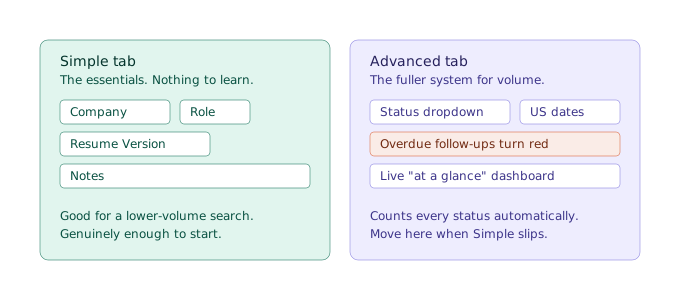
Two versions are built into one file, and you pick the tab that fits where you are:
- Simple Tracker. Four columns: Company, Role, Resume Version, Notes. That's it. If you're early in your search or applying at a manageable pace, this is genuinely all you need. Everything else goes in Notes, in whatever shorthand works for you.
- Advanced Tracker. The fuller system for a high-volume search: a status dropdown, US-format date columns, automatic red highlighting for overdue follow-ups, and a small dashboard that counts where everything stands at a glance.
Download the free Excel template →
Free. No email required, no account, nothing to sign up for. Use it, change it however you like. It also imports cleanly into Google Sheets. The setup section at the end covers both.
If you want to understand the thinking behind what to track before you dive in, how to track job applications covers the whole approach from the beginning. If you're already weighing whether a spreadsheet is the right call at all, this article gets into that directly below.
The columns that actually matter
Most spreadsheet templates drown you in columns. Twenty fields per row, half of which you'll never fill in, so you stop filling in any of them by week two. The columns below are the ones that earn their place. Everything else is optional.
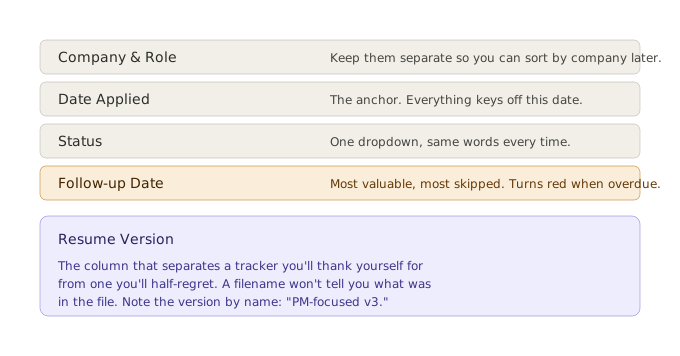
Company and Role. Obvious, but keep them in separate columns, not “Company - Role” in one. You'll want to sort and scan by company later, and a combined field makes that harder than it needs to be.
Date Applied. The anchor for everything else. Follow-up timing, how long a company has gone quiet, whether a posting is stale, all of it keys off this date. In the template it's formatted for US dates (mm/dd/yyyy) so there's no ambiguity between the fourth of May and the fifth of April.
Status. Where the application stands: Researching, Applied, Screening, Interviewing, Offer, Rejected, Closed. In the Advanced tab this is a dropdown, so every row uses the same words and the dashboard can count them. Free-typing “applied,” “Applied,” and “submitted” into the same column is how a tracker becomes unsearchable.
Follow-up Date. The single most valuable column and the one people skip. A follow-up a week after applying is one of the few levers you fully control in a job search. In the Advanced tab, any follow-up date that slips into the past turns red on its own, so nothing quietly ages out.
Resume Version. This is the column that separates a tracker you'll be grateful for from one you'll half-regret. Note which version of your resume you actually sent: “PM-focused v3,” “startup-stripped,” whatever names it for you.
Here's why it matters more than it looks. A filename tells you almost nothing. Three weeks after you apply, “resume_final_v2.pdf” won't tell you whether that was the version leading with platform work or the one you rewrote to emphasize people management. And this is the honest limit of any spreadsheet: the cell can hold the name of the version, but it can't hold the version itself. If you keep editing that file after you apply, the spreadsheet still says “v2” while the actual document has moved on. Knowing exactly what you sent, and being sure it hasn't changed since, is a real gap that resume version control gets into properly.
Start simple. Really.
There's a strong temptation, the moment you download a template, to fill in every column beautifully for the first five applications and then abandon the whole thing by application twelve. A tracker you keep is worth more than a detailed one you quit.
So if you're early, use the Simple tab and don't apologize for it. Four columns. Company, role, which resume you sent, and a notes field where you can jot “applied 4/1, follow up mid-month, referral from Sam” in plain language. That is a completely legitimate way to run a search. Plenty of people land jobs on exactly that much structure.
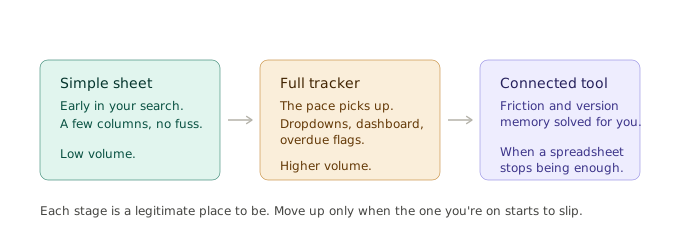
The Simple tab isn't a lesser version you should feel bad about using. It's the right tool for a lower-volume search, and it exists precisely because more structure than you need is its own way of failing. You reach for the Advanced tab when the simple one starts to feel like it's slipping, not before.
How to keep it accurate when the pace picks up
The reason spreadsheets fall apart isn't discipline. It's friction. Every application asks you to open the file, add a row, confirm the date, write the company and role, find the resume file to note the version, and paste in the link. Three or four minutes an entry, at exactly the moment in your search when you have the least time to spare. A few practical habits keep it honest:
- Log the moment you apply, not “later.” Later is where accuracy goes to die. The entry takes thirty seconds if you do it while the application is still open in front of you, and it never happens at all if you save it for the end of the day.
- Let the dashboard do the counting. On the Advanced tab, the “At a glance” panel tallies your applications by status automatically. You don't maintain it, it just reflects whatever your rows say. It's also an early warning system: when the count of overdue follow-ups starts climbing, that's the spreadsheet telling you the pace has outrun your upkeep.
- Close things out. Mark rejections and dead applications as Closed or Rejected instead of deleting them. A search where every application still reads “Applied” three months in isn't organized, it's frozen. Seeing the real shape, including the noes, is part of what keeps you sane at volume.
- Reassess if consistency slips two weeks running. If you've fallen behind on entries for a couple of weeks despite trying, that's not a character flaw. It's the tool reaching its limit for your volume. That's useful information, not a failure.
When a spreadsheet stops being enough
Here's the honest part, and we'll say it plainly because pretending otherwise would waste your time.
A spreadsheet is a genuinely good tool for a job search, up to a point. For a lower-volume, methodical search, it gives you almost everything a dedicated tracker does, costs nothing, and needs no setup beyond what you just downloaded. If that's where you are, you're done. Use the template and get back to applying.
The point where it strains is specific and predictable. It arrives when the pace of applications outruns the time you have to log them carefully, usually somewhere past the fifty-or-so mark, in a search that's been running for months. The breakdown rarely looks like giving up. It looks like the Resume Version column reading “updated version” for twenty straight rows, follow-up dates you stopped entering because you were applying faster than you could track, and a growing gap between what happened and what's written down.
The two things spreadsheets can't solve, no matter how well you build them, are friction and version memory. Friction, because manual entry always competes with the actual work of applying, and loses exactly when the search is busiest. Version memory, because a cell can name a resume version but can't freeze it. When a recruiter calls six weeks after you applied, the spreadsheet can tell you the filename you typed. It can't show you the resume as it was the day you sent it.
That's the gap a dedicated tool closes, and it's worth knowing it exists before you hit it, so the switch is a choice rather than a scramble.
If you want to see how the version side works once a spreadsheet isn't enough, see how resume tracking works in practice.
None of this is a reason to skip the spreadsheet. It's a reason to start with one, use it well, and recognize the specific moment it's telling you it's done.
Set it up in ten minutes
In Excel: download the file and open it. Both tabs, the dropdowns, the date formatting, and the dashboard all come with it.
In Google Sheets: download the Excel file, then upload it to your Drive and open it with Google Sheets. Everything transfers: the dropdowns, the formatting, the dashboard formulas. The spreadsheet includes a short setup note if anything looks different.
Then, whichever you chose: delete or type over the example row (it's there to show the format), pick your tab, and log the last few applications you've already sent so the tracker starts from where you actually are. That's the whole setup.
A tracker you'll actually keep open beats a more elaborate one you'll abandon. Start with the version that fits your search today, and let it tell you when you've outgrown it.
If you reach the point where the spreadsheet is costing you more time than it saves, that's what Vitae Tools is for. It's a job application tracker built around the two things a spreadsheet can't do: it removes the manual-entry friction, and it automatically saves a snapshot of the exact resume version you sent with each application, frozen at the moment you applied. Keep editing your resume afterward and the snapshot doesn't move, so “which version did they get” stops being a question you answer from memory. Your applications, your resume versions, and your follow-up dates live in one connected view instead of one spreadsheet and five folders. It's free to start, with no credit card required.
Vitae keeps your applications, resume snapshots, and follow-up dates in one place, so when the recruiter calls, you have the right information ready.
Create a free accountFree to start. No credit card required.