
Week eight of her search. Anya opened her Google Sheet before a recruiter call and found what she'd come to expect: 67 rows, color-coded by status, a “Resume Used” column she'd been careful about in the beginning.
The entry for the company calling said “resume_marketing_v3.” She'd updated that file at least twice since she applied. She had no way to know whether the recruiter was looking at her operations-focused version or the one that led with her content work.
Both tools work. That's the honest starting point. A job search spreadsheet is a legitimate way to track applications, and for plenty of people it's the right choice.
The question isn't which one sounds more organized. It's which one holds up under the actual conditions of a job search.
This comparison gives the spreadsheet a genuine defense, names the specific point where it fails most people, and explains what a dedicated tracker does differently for the one problem a spreadsheet cannot solve on its own.
If you're managing applications in a spreadsheet right now and wondering if it's still working, see the 7 signs you need a job search tracker.
The Case for a Job Search Spreadsheet
A spreadsheet is free, flexible, and requires no account. You can build one in ten minutes, customize every column, and keep it in the same folder as your resume files. For most people at the start of a search, it is genuinely the right tool.
| Spreadsheet | Dedicated Tracker | |
|---|---|---|
| Cost | Free | Free to start (Vitae) |
| Setup time | 10-15 minutes | 5-10 minutes |
| Works at 10 applications | Yes | Yes |
| Works at 100 applications | With discipline | Yes |
| Automatic resume snapshot | No | Yes |
| Follow-up date surfacing | Manual | Automatic |
A spreadsheet works well when you're in the first three to four weeks of applying, you have fewer than 30 active applications, you're not tailoring your resume per role, and you update the sheet within 24 hours of every action. Under those conditions, there's no reason to switch tools. A free job search spreadsheet template covers every column you need and gets you tracking immediately.
The ceiling is behavioral, not technical. Spreadsheets require manual entry at every step. Every application, status change, and follow-up date has to be typed in and actively checked. That works when a search is new and the habit is strong.
When it stops working depends on the person and the search. Most searches don't fail the spreadsheet overnight.
Where Spreadsheets Start Breaking Down
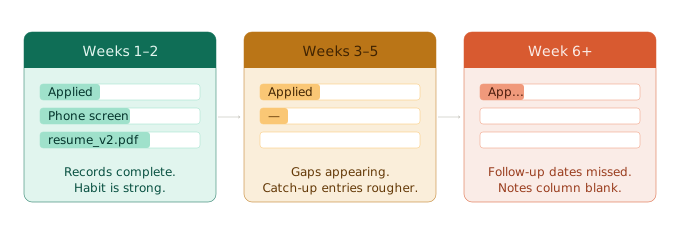
Mia set up a meticulous spreadsheet in week one. Color-coded rows by status, dropdown menus for every field, conditional formatting that flagged overdue follow-ups in red. By week six she had 78 rows. About 22 had gaps in the resume column.
Sixteen follow-up dates had passed without a follow-up sent. The notes column for her most recent 35 applications was blank. The spreadsheet was thorough. The person using it wasn't, not because Mia is disorganized, but because consistent data entry at that volume requires a discipline that most job searches will eventually erode.
That pattern is common. Spreadsheets stay maintained well for the first two to three weeks. By week four or five, when the search gets harder emotionally and applications are piling up, the habit of opening and updating the sheet every morning is the first thing to slip.
Entries get incomplete. Rows go blank. The “Follow Up By” column has dates in it but nobody's scanning it.
The scale problem makes it worse. The Bureau of Labor Statistics puts the average job search at five to six months for unemployed workers. At 10 to 15 applications per week, that's 200 to 400 applications over a full search. The spreadsheet that felt easy to maintain at 25 rows is a different object at 100.
Tracking job applications at scale requires a different approach than tracking the first dozen. The strategies that hold up look different from what works in month one.
What a Job Application Tracker Does Differently
A good job application tracker reduces friction at the moment of logging and makes certain information reliable in a way a spreadsheet cannot.
Three differences matter most:
Automatic resume snapshot. When you log an application in a tracker built for this, it captures the resume version you were using at that moment. You can edit the resume afterward and the snapshot stays unchanged. The record of what you submitted is locked.
Follow-up date surfacing. In a spreadsheet, the “Follow Up By” column only works if you open the sheet and scan it. A tracker can surface those dates without requiring you to remember to check.
Lower friction on status updates. Updating a status in a tracker takes less effort than opening a spreadsheet, finding the right row, clicking into a cell, and making the change. Less friction means updates actually happen.
The behavioral point matters more than any feature list. Lower friction at every step leads to more consistent records. More consistent records means the data is accurate when you actually need it.
One honest note: a tracker is not automatic. You still have to log each application. The information is only as good as what you put in. What changes is what gets captured reliably once you log it, specifically, the resume version.
Vitae is a free job application tracker, which means this comparison isn't “$0 vs. $12.” Both tools are free for a typical search ( see Vitae's full pricing for what's included at each tier). The comparison is purely about what each one can and can't do. See how Vitae's application tracking works.
For a full side-by-side of the top tracker apps available now, our 2026 job application tracker review covers five of them.
The Resume Version Problem: Where Spreadsheets Fail Hardest
This is the specific problem that every other spreadsheet-vs.-tracker comparison skips, so it's worth being direct about it.
Most active job seekers tailor their resume. One version leads with operations experience. Another emphasizes project management. A third is stripped down for a startup.
That's smart. The problem is what happens to the “Resume Used” column in your spreadsheet after six weeks and four or five versions.
At best, the column says a filename: “resume_ops_v2.pdf” or “resume_FINAL_updated.pdf.” Filenames don't freeze at submission time. You'll edit that file. You'll save changes.
And when a recruiter calls two months later about a role you barely remember, the filename tells you nothing about what they actually received. Did “resume_ops_v2.pdf” include the supply chain project? Was that before or after you restructured the experience section?
A spreadsheet “Resume Used” column captures what you thought you were submitting. It cannot capture what was in the file at that moment.
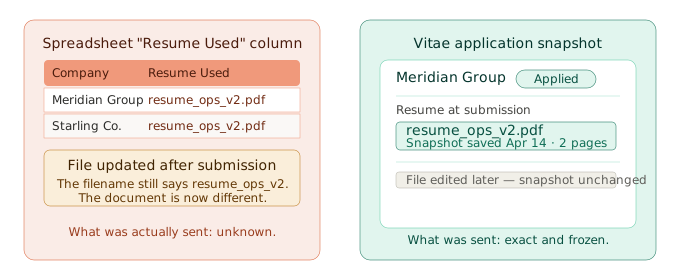
That gap matters when a recruiter asks something specific about your background. “I think I sent the operations version” is not the same as knowing.
Resume version control gets more complicated the longer a search runs and the more versions you're actively maintaining. A spreadsheet column can remind you of intent. It cannot tell you what the document contained.
A tracker that snapshots at submission time freezes the version. The snapshot is tied to that specific application and doesn't change when you edit the file later.
How to Build a Spreadsheet That Holds Up Longer
If you're staying with a spreadsheet, these columns are non-negotiable.
Required Columns
- Company name and exact role title (copy from the posting)
- Date applied
- Job posting URL (save it before the listing disappears)
- Resume filename and the date you sent it (“ops-v2.pdf, April 14”)
- Application status
- Follow Up By date
- Contact name and email if you have it
- Notes: any detail from the posting or your application worth remembering
The discipline requirement is strict: log every application within 24 hours of submitting. If you fall behind by more than a day, you'll spend catch-up time reconstructing details you can no longer fully remember, and you'll never fully catch up.
One limit holds regardless of how well the spreadsheet is built: it cannot automatically freeze your resume version at submission. You can note the filename. You cannot prevent the file from changing after you send it.
When to Switch from a Spreadsheet to a Dedicated Tracker
Any one of these is a real signal:
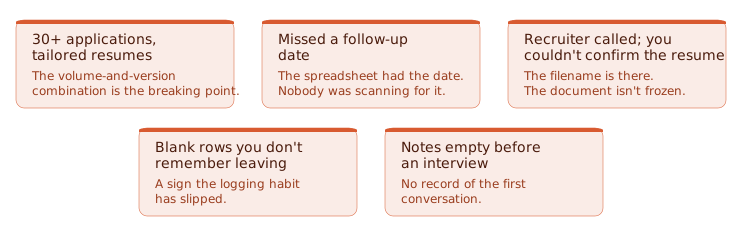
The moment most people know for certain: they're reviewing notes before a second-round interview and the notes field for that company is completely blank. No record of the first conversation, no interviewer name, nothing about what was discussed.
Marcus had this happen in May. He'd been meticulous in week one and spotty every week after. He got through the second round on memory alone. He did not get a third.
If any of those signals sound familiar, Vitae's free tier costs nothing to try. Create a free account.
Neither tool is wrong. A job search spreadsheet is the right answer for an early, lower-volume search where you're not tailoring resumes per role. A dedicated tracker earns its place when the spreadsheet starts producing unreliable records: the moment you open it before a call and you cannot confidently tell someone what you submitted.
Vitae tracks your applications, captures your resume version at submission, and surfaces follow-up dates when they're due. Free to start, no credit card required.
Create a free account.