
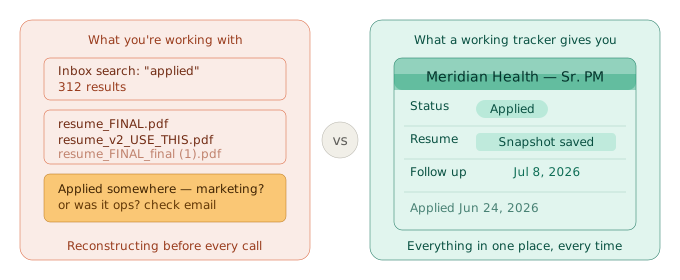
A recruiter calls from a company you applied to. Good news. Except you spend the first three minutes searching your email for the job posting, checking your downloads folder for the right resume version, and scrolling your notes app trying to remember anything specific about the role. By the time you're ready to actually talk, you've already made an impression.
Most job seekers start with a reasonable system. A spreadsheet, a folder of saved PDFs, maybe a note for each application. That approach holds up for the first fifteen or twenty applications. It's when a search stretches to thirty, fifty, or a hundred applications that things quietly fall apart.
Here are seven signs that your job search tracker system has stopped working. If you want the full setup guide instead, how to track job applications covers everything from scratch.
Sign 1: You've Applied to the Same Job Twice
You see a listing that looks familiar. You're not sure if you already applied or just bookmarked it. You apply again to be safe, and a few days later you find the original confirmation email from three weeks ago.
Duplicate applications are one of the clearest signs you've lost track of job applications at scale. The issue isn't carelessness. It's that a job search at any real volume generates more information than memory can reliably hold. If you're applying to ten or fifteen roles in a week, you need a searchable record, not a mental one.
A job search tracker eliminates this entirely. One entry per application, date logged, company name searchable. You never have to wonder.
Sign 2: You've Missed a Follow-Up Window
You were excited about a company. Two weeks passed and you forgot to follow up. By the time you remembered, the role had been filled.
Follow-up timing matters. A well-placed note two weeks after applying keeps you visible when hiring decisions are often still in progress. But follow-up only works if you track the date you applied and have a system to surface it at the right moment. A mental note doesn't hold for thirty applications at once.
This is one of the more painful signs, because it's impossible to know what you lost. The role might not have worked out regardless. But missing the window removes the option entirely.
Sign 3: You Can't Calculate Your Callback Rate
You've been applying for six weeks. Things feel slow. What you don't know: exactly how many roles you've applied to, how many callbacks you've gotten, or whether your rate is low, average, or better than you think.
Without a complete record, you can't learn from the data you already have. Your callback rate tells you whether your resume is working, whether your targeting is on, and whether the pace of your search is on track. If you can't calculate it, you're iterating blind.
Tanya had been searching for eight weeks and felt like nothing was landing. She spent an afternoon reconstructing her application history from email confirmations and browser history. Final count: 64 applications, eight callbacks. That's 12.5%, above the roughly 8% benchmark tracked by industry sources. The search wasn't failing. It felt slow because she had no frame of reference. Once she had the numbers, she stopped second-guessing her resume and focused on interview prep instead.
The Bureau of Labor Statistics has consistently found job searches running five to six months on average for unemployed workers. At ten to fifteen applications per week, that's several hundred applications over the course of a search. Managing that volume without a tracker isn't a discipline challenge. It's a math problem.
Sign 4: You've Lost Contact Information Mid-Process
A recruiter emailed you twice from a personal Gmail address. You didn't save it anywhere. Now their follow-up messages to the company address are going unanswered, and you can't find the original thread.
This happens more often than it should. Recruiters use personal email. People you meet at events give you a business card that doesn't make it into any system. A contact's LinkedIn goes quiet and you have no other way to reach them.
A tracker that ties contacts to specific applications solves this. Not a separate contacts app, not a sticky note: a record that lives next to the application it came from. When you need it, you know exactly where to look.
Sign 5: Your Spreadsheet Has Blank Rows
You set up a tracker with every intention of using it. Company name, role, date applied, status, resume version, notes. It looked organized for the first two weeks.
Now half the rows have a company name and nothing else. A few have wrong dates. Several have a “Resume Used” column that says something like “the updated one” and nothing more specific than that.
A spreadsheet with incomplete entries isn't really a tracker. It's a partial record that creates false confidence. You think you have a system, but the data can't tell you anything useful.
The problem usually isn't discipline. It's friction. When logging an application requires opening a separate tab, formatting a new row, and remembering what you named your resume file three weeks ago, it stops happening consistently. If the system requires too many steps, you stop using it at exactly the moment when your search gets busiest.
Sign 6: You Don't Know Which Resume They're Looking At
An interview is scheduled for Thursday. You pull up your resume to prepare. You've edited it four times since you applied to this company six weeks ago.
The summary is different now. One bullet you'd planned to talk about has been cut entirely. You don't know which version they're looking at, and that matters, because the questions are going to come from what's on their screen.
This is the sign that most job search advice never mentions. Every interview prep checklist tells you to review your resume. Almost none addresses the fact that if you've been actively tailoring per application, the resume you're reviewing may not be the one they received.
Marcus had a first-round phone screen at 9 a.m. At 8:45, he opened his resume to prep. He'd made substantive edits twice since he applied. He spent the first part of the call half-focused on the conversation and half-focused on piecing together which version had been attached to the original application. He got through the screen, but it cost him his composure going in.
The solution is a frozen record: when you log an application, the exact resume version at that moment gets captured. Edit the resume afterward and the record stays unchanged. When the interview comes in, you pull up exactly what they're working from.
That's what Vitae's snapshot feature handles. See how the resume version tracking works if you want to understand how it fits into an application workflow. It's the piece most job search advice skips entirely.
For a deeper look at why version records matter and what a reliable system looks like, resume version control covers the full picture.
Sign 7: You're Doing More Admin Than Applying
You have forty-five minutes before you need to leave for an interview. You spend it trying to reconstruct what you've already done: which companies have which resume version, which roles you applied to through which job board, what you said in a cover letter three weeks ago.
When your system isn't working, it steals time from the work that actually moves your search forward. Every minute spent reconstructing history is a minute not spent tailoring a new application, researching a company, or prepping for an interview.
A functioning job search tracker should reduce admin, not add to it. If maintaining it feels like a part-time job, the system is wrong.
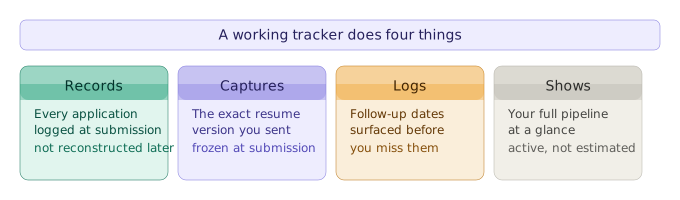
What a Working Job Search Tracker Actually Looks Like
A working job search tracker does four things: it records every application as you submit it, it captures the resume version you sent, it logs follow-up dates, and it shows you your full pipeline at a glance.
That's the baseline. A job application tracker doesn't need to be complex to work. It needs to be complete.
How to organize your job search like a project manager covers the broader approach: how to structure your week, run a weekly review, and keep the pipeline moving without burning out. The tracker is one piece of that system, but the most foundational one.
If three or more of the signs above are familiar, your current setup has outgrown what it can handle. That's not a character flaw. It's a scale problem, and scale problems have solutions.
Vitae keeps your applications, resume snapshots, and follow-up dates in one place, so when the recruiter calls, you have the right information ready.
Create a free accountFree to start. No credit card required.